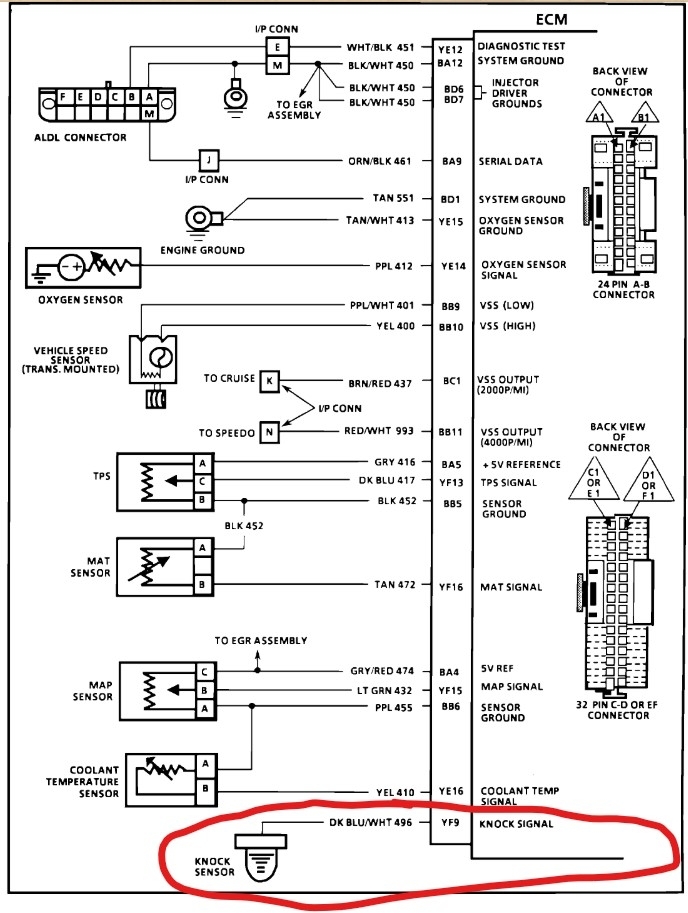
Need to know which wire connector on the ECM controls the knock sensor data.

Tiny
CUT213
  • MEMBER
  • 1989 OLDSMOBILE CIERA
  • 2.8L
  • V6
  • 2WD
  • AUTOMATIC
  • 15,500,198 MILES
Code 43 issue. After several months of failing to resolve this issue, recently came across info that resulted in a discovery as to the actual cause of this issue. In need to probe the wires at the ECM connection in order to check for a possible short to power of the actual Knock Sensor wire. It strongly suggest that the knock sensor wire is getting a power spike from another source only while the engine is running. Key off test indicate normal function of the knock sensor functions, but when the engine is actually running the circuit is actually spiking in excess of 6.875 volts. This is the problem for the code 43 light staying on, the ECM relates this to a "DETONATION KNOCK". This means one of two things, A short to power in the wire circuit or faulty mem-cal. So I need to which connector on the ECM module holds the Knock sensor wire. I need to conduct a continuity on this circuit and see if I can determine which other wire might also be connect to this circuit. If I can not find the source of the fault this way then I will cut the knock sensor loose close to the main wire connector and add a new wire directly to the knock sensor and retest the results to see if this removes the power spike to the knock sensor circuit. I need to know which connector and which pin and the wire color on that connector. Thanks!
Sunday, December 14th, 2025 AT 10:35 AM

35 Replies

Tiny
STEVE W.
  • MECHANIC
  • 15,540 POSTS
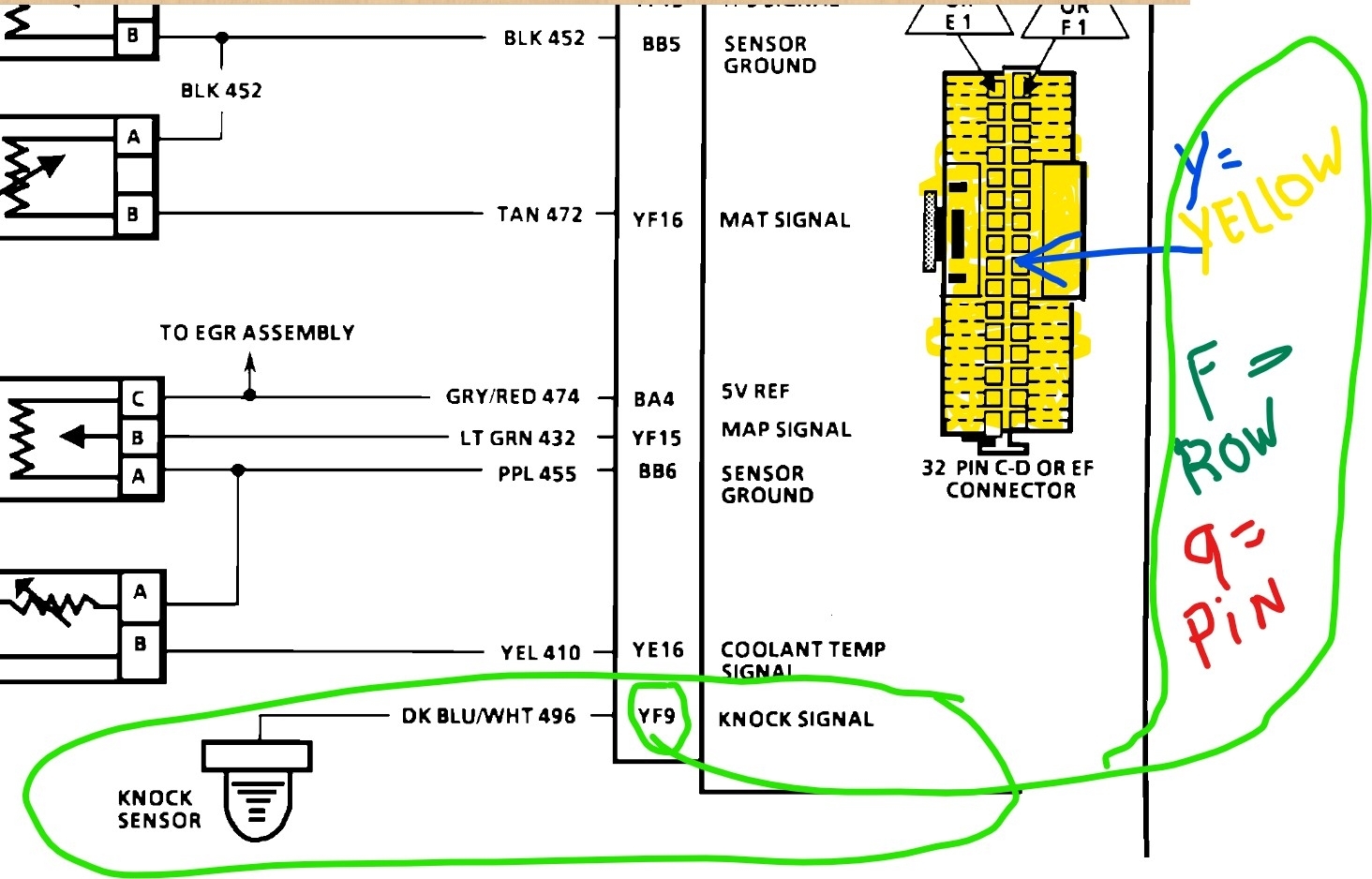
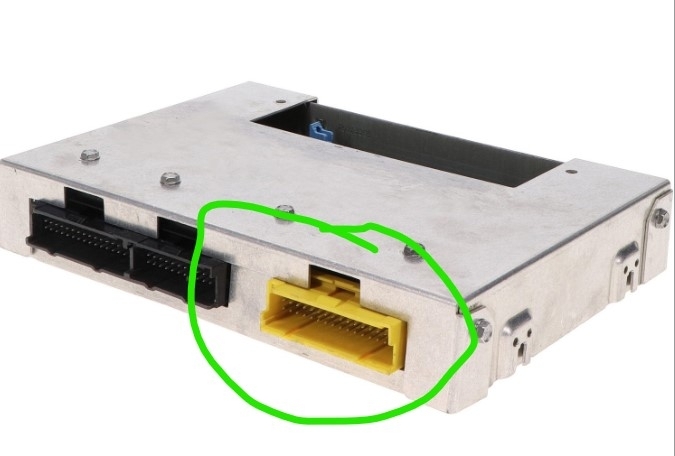
On an 89 I'd suspect the ECM over a short but Here is the connector info. You are looking for a Dark Blue wire w white trace on terminal 9, row F, in the yellow 32 pin connector. Unplug it, de-pin the connection and plug it back in. Start the car, any voltage on the wire with it disconnected? Yes, run an overlay. No - check the ECM pin, does it show high voltage? Yes - bad ECU.
Was this
answer
helpful?
Yes
No
+1
Sunday, December 14th, 2025 AT 1:20 PM
Tiny
CUT213
  • MEMBER
  • 55 POSTS
How come ALL my previous questions and replies are blocked? And I see another reply was added to this question and I can not see that reply or added image. WHY?
Was this
answer
helpful?
Yes
No
Tuesday, December 16th, 2025 AT 8:20 AM
Tiny
STEVE W.
  • MECHANIC
  • 15,540 POSTS
I don't know the answer to that. Did you log in with the same account as your earlier posts? I know the site had a bunch of issues for a while thanks to a google mess but beyond that I just log in and see the questions that don't have replies or answers and try to assist. I'm sorry you have had problems. I see my reply and three images that I added. Is that what you see?
Was this
answer
helpful?
Yes
No
Tuesday, December 16th, 2025 AT 12:08 PM
Tiny
CUT213
  • MEMBER
  • 55 POSTS
Yep. Normal login. Go to my questions. Pick ANY question including this thread we are speaking about. Touch the Blue Highlight to go to what ever post is mine, new screen pops up, at top it said " About Blank: BLOCKED". Screen stays white and blank. The only way I can open the screen is to go to my Email, find the link and click on it. New screen opens but only to this current post. Can not access any other of my post. Can not see any of the past post. If I just login and go to my questions or my replies, I can see the topics of all my post including this post but, can not access ANY of the post from the login screen. None!
OHHhhh. By the way, Thanks for the info. That should get me to where I get this issue resolved after two years and almost 6000 miles driving with code 43 light and retarded timing and awful gas mileage. I got to clear the work shop so I can get this car back inside out of the weather, so I can teardown, test the wires and determine what is at fault. Been a looooong battle on this one. Hard to find solid info on the OBD1 vehicles. Thank you so much!
Was this
answer
helpful?
Yes
No
Tuesday, December 16th, 2025 AT 5:16 PM
Tiny
CUT213
  • MEMBER
  • 55 POSTS
If I just simply login, as you normally do, I can see all kinds of post and questions, but I can not access or open ANY of the answers or post. All content is blocked completely. The ONLY way I can see this current is to use the link in my email. But that only allows access to the current on going question for replies. Nothing else is accessible!
By the way "Thank You" for your response to my question Steve. With this info I should now be able to bring this problem to a closed issue after 2 years of battling with this car.
I got to clear a space in my shop to get it out of the weather so I can crawl over and around the vehicle and stay dry and warm!
Was this
answer
helpful?
Yes
No
Tuesday, December 16th, 2025 AT 5:38 PM
Tiny
STEVE W.
  • MECHANIC
  • 15,540 POSTS
OK, I'll forward the issue to my boss thank you for the description of the problem.
Was this
answer
helpful?
Yes
No
Tuesday, December 16th, 2025 AT 8:14 PM
Tiny
CUT213
  • MEMBER
  • 55 POSTS
How come I CAN NOT accessmy replys?
Was this
answer
helpful?
Yes
No
Thursday, December 25th, 2025 AT 1:44 PM
Tiny
KEN L
  • MASTER CERTIFIED MECHANIC
  • 54,852 POSTS
Try clearing your cookies?
Was this
answer
helpful?
Yes
No
-1
Friday, December 26th, 2025 AT 9:22 AM
Tiny
CUT213
  • MEMBER
  • 55 POSTS
That did nothing. I login, I can go to "MY QUESTIONS", I can see them but.I can not access them or anything else on this web site. Only reply I get is "about:blank#blocked" and a blank screen. I have several 'Questions" that have been posted that I wanted to access for info that was done to the car and some images of graphs and wiring schematics. I can't open and view ANYTHING AT ALL. I just get a blank screen with the above message, and now I can't even access the late reply's.
Was this
answer
helpful?
Yes
No
Friday, December 26th, 2025 AT 12:05 PM
Tiny
STEVE W.
  • MECHANIC
  • 15,540 POSTS
What browser are you using and on a pc or phone? When did this start? Do you run an adblocker? Just trying to figure out what it might be.
I've seen that a couple of times on other websites after a browser update (thanks google chrome.) For those it turned out to be some new security feature that was active in the browser to block "suspicious websites" went in and whitelisted them and they suddenly worked. Commonly it's a security issue where it doesn't recognize something security related. You might try changing your password. Or if you have a different browser available. Log out with the one you are using and see if you can log in from the other one. OH another possibility if you are using chrome, look on the address bar at the right side, if you see a padlock, right click and select Allow.
Was this
answer
helpful?
Yes
No
Friday, December 26th, 2025 AT 3:26 PM
Tiny
CUT213
  • MEMBER
  • 55 POSTS
I just found a message notice it reads as follows: "MEMBERS AREA you do not have access."
What's wrong. When I login it recognizes me by name because it actually has my name in the upper left corner of the page.
Was this
answer
helpful?
Yes
No
Friday, December 26th, 2025 AT 3:33 PM
Tiny
CUT213
  • MEMBER
  • 55 POSTS
Well not actually MY name. My login name is displayed up there. But the login name is incorrect! It has been shorten by three letters. But again. It does recognize the login.
Was this
answer
helpful?
Yes
No
Friday, December 26th, 2025 AT 3:42 PM
Tiny
STEVE W.
  • MECHANIC
  • 15,540 POSTS
I've seen that one a few times, it was usually a glitch in the way the browser sent the password to the site, resolved itself after I logged out and back in. Wish I had a better answer for you.
Was this
answer
helpful?
Yes
No
Friday, December 26th, 2025 AT 3:47 PM
Tiny
STEVE W.
  • MECHANIC
  • 15,540 POSTS
I see CUT213 is that correct, be careful if you use anything that appears profane or derogatory, that can cause issues. Maybe log out and use the shorter name you see?
Was this
answer
helpful?
Yes
No
Friday, December 26th, 2025 AT 3:50 PM
Tiny
CUT213
  • MEMBER
  • 55 POSTS
Should read: cutter213
Was this
answer
helpful?
Yes
No
Friday, December 26th, 2025 AT 4:15 PM
Tiny
CUT213
  • MEMBER
  • 55 POSTS
Tried 4 different browsers one desktop and an android phone and still can't access the questions or open the reply with out using your supplied link, but, that only works once or twice. I can reply to you only. Can not see anything else useful to me. I'll try again on my wife's laptop. We will see if that works.
Was this
answer
helpful?
Yes
No
Friday, December 26th, 2025 AT 4:38 PM
Tiny
STEVE W.
  • MECHANIC
  • 15,540 POSTS
Is that what it says in your settings area on the site? What happens if you log in with cut213?
Was this
answer
helpful?
Yes
No
Friday, December 26th, 2025 AT 4:39 PM
Tiny
CUT213
  • MEMBER
  • 55 POSTS
My actual login name is my actual email address. That CUT213 isn't the login name.
Was this
answer
helpful?
Yes
No
Friday, December 26th, 2025 AT 4:44 PM
Tiny
CUT213
  • MEMBER
  • 55 POSTS
Earlier I saw a message that read as follows: Member Area you do not have access.
Was this
answer
helpful?
Yes
No
Friday, December 26th, 2025 AT 4:46 PM
Tiny
CUT213
  • MEMBER
  • 55 POSTS
I just tried to use the "CUT213"
It said:"Invalid e-mail address"
Was this
answer
helpful?
Yes
No
Friday, December 26th, 2025 AT 4:53 PM

Please login or register to post a reply.