2CarPros - Car Questions & Answers

2005 BMW X3 Repair Question


Topics covered: Center console, Radio, Dealer.
Mileage: No information provided.

Asked on March 15, 2012

Iphone-4s bluetooth pairing

Recently bought an pre-owned 2005 BMW X3. Unable to pair iphone-4S. I keep getting the message - Make sure "BMWXXXXX is ready to pair, the PIN code is correct, and try again.Not sure what I am doing wrong as I followed all steps from most blogs, forums etc..
Avatar Asked by raghav

Answer

Replied on March 15, 2012

Go to the manufacturer web site and you will find the pairing instructions. You have to do it in the proper sequence for it to take. You can try website for car manufacturer too.

Tiny Answered by DrCranknWrench (expert)
3,292 answers provided
Replied on March 15, 2012

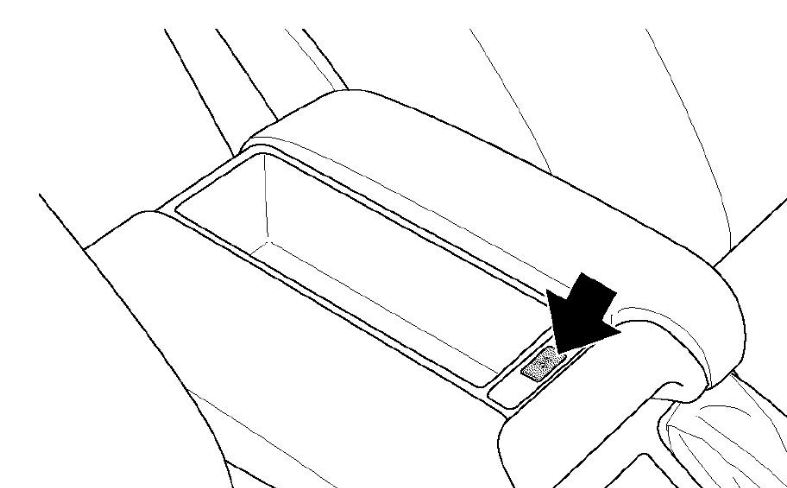
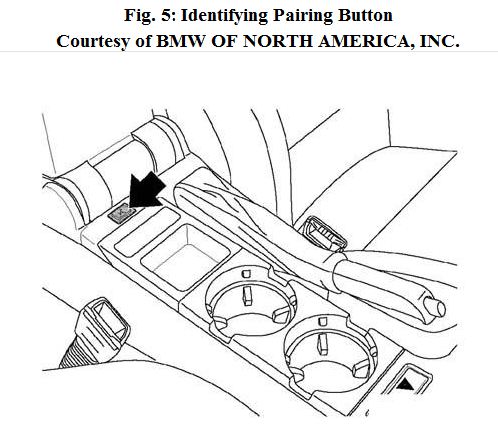
I actually found Pairing instructions in manual. They are numbered, except for number 1 which I left blank. I included the FIGs from instructions. The last instruction was for a Sony Ericson phone and what to do with it. So, you will have to go to manufacturer for some information.

Tiny Answered by DrCranknWrench (expert)
3,292 answers provided
Replied on March 15, 2012

Hi,

Thanks for your reply. I don't see any pairing button as shown in the diagrams. I have a telephone/voice command button and R/T button on the steering wheel. I have a business CD radio (last picture in your attachment)

Steps followed:

1. Keep the bluetooth on and discoverable on my iphone-4s
2. Press & hold the telephone button with ignition = 0 for 3 seconds
3. Turn ignition to 1 position and release the telephone button after 3 seconds
4. Iphone identifies the bluetooth during which I try to pair it by entering the code. I get the message immediately - Make sure "BMWXXXXX is ready to pair, the PIN code is correct, and try again.

I dont see the message BT Pairing message on the radio at all.. Not sure about what is wrong here

Tiny Response from raghav
1 question asked

Replied on March 16, 2012

The pairing button is the one in the center console. I believe the FIG refers to it as some other type of pairing button. But, that is it. The other button in the center console is denoted in the same way.
Just to avoid confusion I am attaching FIGs 4 and 5 the pairing and oddment tray buttons.

Tiny Answered by DrCranknWrench (expert)
3,292 answers provided
Replied on July 30, 2012

Did you ever figure it out? I just called dealer and they told me it's not compatible with iPhone 4S - I also don't have a pairing button...

Tiny Answered by chefang
0 questions asked
Replied on July 31, 2012

Yes, in the rear trunk, left hand side you have a enclosure which you can open. The bluetooth module is present there. The trick is to unscrew the bluetooth module as the code is present on the other side of the module. You need good ratchet set and soft hands to access the screws. Unscrew it and pull the module, turn it you will find the code.

Tiny Response from raghav
1 question asked

Replied on August 9, 2012

Thanks for providing the location of the buttton as our manual did not have the button location.

Tiny Answered by DrCranknWrench (expert)
3,292 answers provided