1991 Chevy Beretta does not idle properly

1991 CHEVROLET BERETTA
138,000 MILES • 6 CYL • FWD • AUTOMATIC
Avatar
GANTHONY1
  • MEMBER
  • 5 POSTS
first time you start the car it runs fine. after runing for a few min. it begins runnig at high rpm. use paper clip on the connector all I get it a code 12. Plug it Snapon scan tool and it will not comminicate with pcm. also when jumpng the connectors the electric fan runs all the time.
Aug 2, 2010 at 7:59 PM

Advertisement
Avatar
JDL
  • CAR REPAIR CONTRIBUTOR
  • 16,098 POSTS
On some of these GM models, when you jumper the A & B terminals, with key on, the fan will run, that is normal. Don't know about your scanner? The scanner I have at home for OBD1 uses an electrical connector that plugs into the cigar liter, then plugs into the scanner. Is your scanner for obd 1?
Aug 3, 2010 at 11:16 AM
Avatar
GANTHONY1
  • MEMBER
  • 5 POSTS
My scanner is either OBD1 or OBD2 it does power up off of a jumper from the battery. I load the info into it plug it into the car and it tryes to communicate but does not. The entire time the SERVICE ENGINE SOON light is on. I remove the scanner and jump A&B terminals and it gives me the code 12 only.
When the car is running the SERVICE ENGINE SOON light goes on and off sometimes stays on longer than others like there should be a code stored but it just gives me the all clear.
Aug 3, 2010 at 12:39 PM
Avatar
JDL
  • CAR REPAIR CONTRIBUTOR
  • 16,098 POSTS
For power you hook directly to the positive battery post? I was thinking if it plugs into the cigar liter, maybe that fuse is blown?

As far as the idle, I'd check the iac and check for a vacuum leak. You can use a digital multimeter to check signals from the map and tps sensors. You could try an idle relearn, don't know if it will help?
Aug 3, 2010 at 1:11 PM
Avatar
GANTHONY1
  • MEMBER
  • 5 POSTS
Yes it does hook straight to the battery. I am feeling here it is a power problem with the pcm. When the car idles normal the service engine light is not on. Then all of a sudden the idle will iccrease and decrease and it also runs rough. I have even disconnected the iac and it made no differance at all. now when the car is started the light remains on and the car idles around 2,000 rpm smoothe for around 10 min. then the light will come on and it wil start acting up.
Aug 3, 2010 at 1:20 PM
Avatar
GANTHONY1
  • MEMBER
  • 5 POSTS
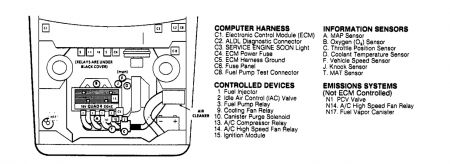
Latest update. When I disconnect the battery wait a few min the reconnect the car will start and run fine for a few min. then it will go to acting up again and the service engine light will begin flickering on and off then wind up staying on. But there are no codes stored. Is this going to be a bad pcm or a bad wire somewhere. All wiring looks good that I have seen. Is there a relay involved with the pcm on this car. There are 5 relays on the firewall. I know one is for the fan, one is for the fuel pump, so what are the rest for?
Aug 4, 2010 at 4:55 AM
Avatar
JDL
  • CAR REPAIR CONTRIBUTOR
  • 16,098 POSTS
Did you try the scanner on a different vehicle but similar, does the scanner work? Block off the iac passages in the throttle bore, any effect on the idle? There should be a big effect, if no effect, look for a vacuum leak. It's probably best not to use your finger to block iac passages. The amount of vacuum at that location is surprising, at least it surprised me, the first time. How many relays you have, may depend on which beretta you have? You may be able to hit control + on your key-pad to enlarge the picture?


https://images.2carpros.com/forum/automotive_pictures/170934_91_beretta_1.jpg

Aug 4, 2010 at 2:03 PM
Avatar
GANTHONY1
  • MEMBER
  • 5 POSTS
Yes I did use the scanner on another car and it worked just fine. It was a 94 Grand Am OBD1. I am either loosing power to the pcm or a ground. Did not get a chance to work on it last night but will tonight. Going to replace both battery cable ends first since owner installed the wrong ones and improperly at that.
Aug 5, 2010 at 12:04 PM
Repair Safety Notice: This information is for general instructional purposes only. Vehicle repair can be dangerous. Verify all information, follow manufacturer service procedures, use proper tools and safety equipment, and consult a qualified repair shop when needed.