2CarPros - Car Questions & Answers

1995 Chrysler LHS Repair Question


Topics covered: Sensor, Spark, Click.
Mileage: 170,000 miles.

Asked on October 9, 2011

No spark

Ive changed the timing tensioner and pully and belt. after putting everything back together. I tried to start the car and there is no spark. so i changed both the cam sensor and crank sensor and still do not get a spark. please help
Avatar Asked by bcummings68

Answer

Replied on October 9, 2011

Check the wiring to the crank sensor for damage. Check to see if there is power to the crank sensor.

Tiny Answered by Jacobandnickolas (expert)
57,472 answers provided
Replied on October 9, 2011

ive check the wires leading to it and did not see any damage at all to the wires or connector

Tiny Response from bcummings68
2 questions asked
Replied on October 9, 2011

Have you checked for power to the sensor?

Tiny Answered by rivermikerat (expert)
5,495 answers provided

Replied on October 9, 2011

i checked power to both the cam sensor and crank sensor and niether are getting power

Tiny Response from bcummings68
2 questions asked
Replied on October 9, 2011

I need to know what engine you have so I can get you the right schematic to trace the circuits for the 2 sensors.

Tiny Answered by rivermikerat (expert)
5,495 answers provided
Replied on October 9, 2011

its a 95 lhs with the v-6--3.5 VIN F

Tiny Response from bcummings68
2 questions asked

Replied on October 9, 2011

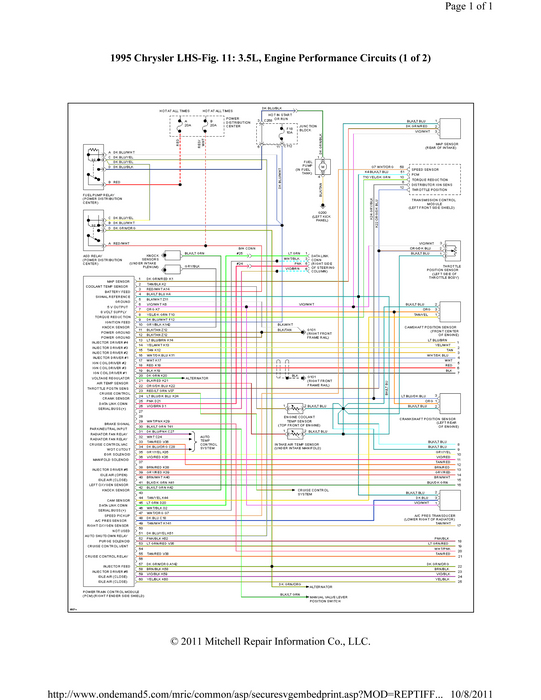
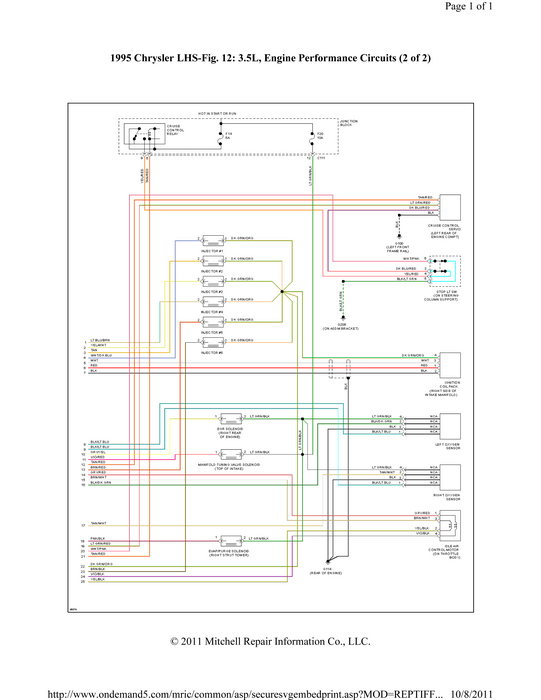
Here's the 2-part electrical distribution schematic. The first one looks to be more helpful than the second.

Tiny Answered by rivermikerat (expert)
5,495 answers provided
Replied on October 9, 2011

i cant read them at all they are like to blurry or something when i enlarge them and when i print them out i cant see them at all.

Tiny Response from bcummings68
2 questions asked
Replied on October 9, 2011

Hrmmmmm. Ok. Gonna try and do something about that with Photoshop.
I'm not having that problem no matter what viewer I use. I'm using a laptop with a 15" display. When you print the picture, tell the printer driver to fit the image to the page or print full page.
I know: Right click the images and select "Save Image As...", then save the image somewhere on your drive you can find easily. That should fix it for you.

Tiny Answered by rivermikerat (expert)
5,495 answers provided